Once you have tried this asset, we would really appreciate your rating / review on the Unity Asset Store.
August 2026 ★★★★★ Limitless Potential
The recent v2.1 update makes the workflow even smoother with the new Inspector shortcut under the “Add Component” button. I still have much to learn to fully master it, but UIFX is extraordinarily well-crafted, and I feel it’s an asset that will only keep evolving with every update! – Qx7Bv2
August 2026 ★★★★★ If you do anything with Unity UI, just buy it
UIFX v1 was already the best UI asset in my library, so when v2 dropped I bought it without a second thought - and it was the right call. The quality is on another level: effects that would normally mean writing custom shaders and fighting Unity's canvas system are a component and a couple of sliders here. Everything is drag-and-drop simple, but there's real depth once you start layering things. What really sets it apart though is the author. He's genuinely present - answers questions fast, actually listens to feature requests, and keeps improving something that was already excellent. That level of involvement is rare on the Asset Store. If you do anything with Unity UI, just buy it. – Sollare
July 2026 ★★★★★ The Gold Standard for Unity UI Effects
I've owned the author's assets since the early days, and upgrading to 2.0 was a no brainer. The quality is outstanding, but what impresses me even more is the long term commitment. He didn't stop at building an amazing collection of effects for uGUI, many of which were added based on my requests, and is now bringing that same magic to UI Toolkit one feature at a time. That's exactly what the Unity ecosystem needed and shows how much he genuinely cares about his users. This is one of those rare assets that keeps getting better over time, and it's easily one of the best investments I've made for Unity UI development. – alizdesk
March 2026 ★★★★★ I love the asset!
It makes adding fun and satisfying effects to the UI that seem impossible to add in Unity. The dev is also very helpful and responsive. I had an edge case bug with UIFX not working with Text Animator, but after I managed to make a small reproduction project, the author sent me a fix in 15 minutes :) I very rarely buy assets, but this one was definitely worth it! – PanMadzior
July 2026 ★★★★★ Great for UI effects and animations
The features are super easy to implement and are very user friendly for those who want to load it up and test out some of the features, without wading through a user manual. It looks like they've continued to make improvements in Version 2.0 – Greyblade
December 2025 ★★★★★ Great Support
The creator added a feature I requested in almost a day. Updates have been coming for years regarding optimization and new features. An asset that must be present in every project. – caglarenes
October 2025 ★★★★★ Love it!
It's pretty much become essential for all of my UI needs. Easy blur, glow, edges, shadows, you name it. Haven't ran into any performance issues even with quite a few effects visible at once. – TheNishishiro
September 2025 ★★★★★ Perfect asset and lovely creator
Check out the functionality and if that's what you need - go get it. In case of any bugs/questions author provides exceptional level of support at his Discord server. – Hellfim
February 2025 ★★★★★ You really won't find any better deal than this
Best UI bundle on the market, period.
Every time I use it I grasp a bit more on how amazing this bundle is. Playing with it and combining the effect in it gives near endless possibilities. Support is superb, the developer is very keen on evolving it and fixing bugs. You really won't find any better deal than this. – trueicecold
November 2025 ★★★★★ This is a very powerful effects tool
With its robust features, it can handle most effects you'd need. The original images do get slightly distorted when they're small, but it's within an acceptable range. Above all, the feedback on Discord is very friendly and fast. Highly recommended! – makumpa
February 2026 ★★★★★ Complete UI System
This is the most complete UI system on the assetstore. Thank you. – luffttaro
August 2025 ★★★★★ Wonderful for quick results / Great support
You can quickly build the exact elements you need. Filters and effects stack together, creating even more interesting results. I use this asset in every project when building UIs, and it works really well with different styles. Want a slick, modern, and clean look? A bit of tweaking with the Frame Filter and Drop Shadow Filter, and within 10 minutes everything looks sharp and professional. Prefer something more futuristic? Try stacking Outline Filter, Gradient Fill Filter and a Glow Filter for a striking effects. The possible combinations are vast. The support is also excellent. With many assets, you need endless patience to get a reply - but not here. Chocolate Dino is always quick to respond, and the communication is genuinely friendly. – kon85
July 2025 ★★★★★ Easy and practical
Super convenient to use, and does what it does well. Lots of customization options. – naezith
June 2025 ★★★★★ Easy to use, with excellent support
The components are so intuitive out that I rarely needed the documentation or the examples for reference. Everything mostly worked as expected and the one time I did run into an issue, support was very fast with a same-day response and easy workaround. – mpgholden
June 2025 ★★★★★ Just great
I wish I knew about this asset years ago. Saves a lot of time. – applicattura
June 2025 ★★★★★ Excellent Bundle / It Just Works
Looking for a way to juice up your boring UI? This is it, and amazingly it will give you the desired effect nine times out of ten without even scripting. Don't like the Unity UI buttons looking like an ugly box? Round them to your desired spec with the Frame Filter. Need to make the selection of UI elements feel better? Try the Glow, Extrude, or Gradient Filters. Without scripting, I was able to amp up my UI to a much more desirable setup in about a half hour (almost any other asset generally takes an hour to get acquainted with). With scripting, I'm in total control of the entire feel down to all of the on-hover effects and timing of selection events. To this end, the sample scenes provide plenty of helpful scripts and examples you can extend or in some circumstances just use (although, of course, with updates you wouldn't want to necessarily do this). I strongly encourage people on the fence to go look through the various demonstrations Choc Dino has prepared showing off the power of this asset. Documentation is reasonably solid and support is timely and responsive as well via Discord. – mrvexed
May 2025 ★★★★★ Simple and working perfectly
Does what it say it will do, so perfect, because it does a LOT. – Ltk-Stark
May 2025 ★★★★★ A must-have for anyone looking to visually enhance their UI!
I primarily bought this asset specifically for the skew effect it provides, however, I've managed to find uses for most other effects. This is never leaving any project I work on for as long as it's maintained, it is lightweight, highly customizable, and provides a great all-in-one solution to a variety of issues. Most of the interface for my project is skewed by a set amount of degrees. Prior to this, I was baking the skew into sprites directly, but this meant that if I wanted to adjust button height, I would end up messing up the precise angle I had selected. This bundle solves that, and while it's a little odd because the skew means it's shifting the plane outside of actual UI plane's border, it's very easy to set up and overall this is a non-issue for every use case I have. I've also managed to find uses for the outlines and drop shadows (it is much better than the ones provided by Unity's standard UI system. The customizability and compatibility with TextMeshPro is amazing. The provided dissolve shader I've been using for animation transitions between menus. It gives a really clean look to my UI that all of my playtesters have loved. This bundle basically spearheaded me redesigning and refining massive portions of my user interface - which was a task I did not expect to take on, but I saw a lot of opportunity and I took it as soon as possible. This is not implemented yet, but do not underrate the Camera Source effect, it can be used for a large variety of things, my main use case would be showing the character the player is playing as an animated 3D model that can change states, all with the power of the Canvas system. After some testing, this is totally possible. The last but DEFINITELY not the least thing is the developer support. Chocolate Dinosaur is one of the most honest and supportive asset developers I've ever seen on my decade using Unity. I asked in the Discord if there was a better demo of the skew effect, and they opened up the demo project specifically and put together a quick animation showcasing specific parts of the asset pack - it was a really kind gesture and this was basically within 5 minutes of me posting my message. In conclusion, if this review doesn't convince you this is worth every penny - I truly don't know what will. This is one of the most insane value propositions I've seen on the asset store and this bundle serves to provide value to nearly any project that interacts with Unity's UI system. I have nothing even remotely bad to say about this bundle, it's a fantastic product that can potentially save one weeks of time. – SHADERS2018
April 2025 ★★★★★ Works flawlessly
This is a very good Unity package for UI, works flawlessly once set up. I recently encountered a compatibility issue, but the support team responded quickly and resolved it without hassle. Really impressed by both the functionality and the support. Highly recommend! – victorcavagnac
April 2025 ★★★★★ Best tool for UI
I’ve been using this tool for a long time, and it truly deserves five stars. The developer has also supported it with many great updates over time. – UnityGameDev70
April 2025 ★★★★★ Saved my life
Saved my life. Really good asset and regular updates, support team is very responsive, love it! – bendogami
March 2025 ★★★★★ developer is absolutely on top of it!
Very versatile, developer is absolutely on top of it!
At first I was cautious about spending that amount of money, but I'm glad I did. It's a very straightforward package, the documentation is helpful but it's not so dense that you have to look too long for what you need. What you see is what you get here. And to make it even better, the developer was shockingly fast to help me out with the tiniest issue I had -- which wasn't even an actual issue, just something I overlooked. Looking forward to seeing development continue on this, everything that is included so far is stellar and I know I'll get lots of use out of this. – okayeiko
February 2025 ★★★★★ Beautifully implemented
Outstanding. Beautifully implemented. Seriously, it's so great in so many ways - just try it. Great work developer! – LazyMondayGames
January 2025 ★★★★★ UIFX is an absolute game-changer
A Must-Have for Stunning UI Effects!
UIFX is an absolute game-changer for anyone looking to enhance their user interface with professional-grade visual effects. The asset is incredibly versatile, offering a wide range of customizable animations – BaoBao55
January 2025 ★★★★★ Very practical
Very practical – Artgital
January 2025 ★★★★★ Absolutely love this package
Look no further for UI effects!
I try not to spend this much on assets typically, and usually work out my own, but with this one it was too good of a deal to pass up. After using it and seeing how easy it is, I would have almost paid double the price! The author is amazing with their support, especially on discord and very open to suggestions and helping and feature requests! Oh, and the effects? Those are top notch! Have to be careful on lower end hardware, but that's pretty normal for any asset. The glows, drop shadow and outline have all replaced the default TMP options with a much higher quality and better looking result! Integration is superb, simply add the component to your UI object, adjust your parameters and see it all updated in real time. Want 3 or more filters? Go for it! Absolutely love this package and have used it on the last 3 projects, and looking forward to using it on all the future ones! Definitely worth 6 stars if it were possible! – SquigglyFrog
December 2024 ★★★★☆ has the best UI outline I've tried
Nice asset, but not compatible with Text Animator/Typewriter.
Lots of cool features here that are great to play with (also has the best UI outline I've tried, and I've tried a lot of them), but sadly the Text Mesh Pro effects prevent Text Animator and Typewriter from also functioning. I hope that gets addressed in an update! It would be great to be able to have real drop shadows on my animated text. – steelfeathers
December 2024 ★★★★★ one of the best assets I've purchased
Amazing UI Filters and Effects.
These effects look so great. It brought my game's UI to a whole other level. The asset is extremely well documented, and the sample scene provides examples of everything it can do. Adding these effects to my own project afterward took less than 2 minutes - it's that easy to use. Support responds really quickly and was very helpful, which was very appreciated. The quality and ease of use makes this one of the best assets I've purchased. – metaforgeapps
November 2024 ★★★★★ UIFX is amazing
Incredible set of effects.
UIFX is amazing. I can't recommend it highly enough! You get a wide variety of effects that you can apply to any of your UI to really give it the extra push you need. Our game wouldn't look the same without it. In my opinion, TextMeshPro's default shader effects are inadequate when you're looking for something much more polished. UIFX is simple to use and modify. The developer is also quick to respond to any issues you might potentially face. It's also very performant! We've had no issues with performance thanks to its baking and internal caching features. All in all, I highly recommend it. It saves you much time and gives you a highly polished result! – NavidK0
October 2024 ★★★★☆ Simple and powerful
Good Asset!
Simple and powerful. It would be even better if text animator is also supported! – Scichopath
August 2024 ★★★★★ Best Asset with Great Support!
Best Asset with Great Support!
This plugin has been incredibly useful, and I've implemented it in many aspects of my game. It has significantly improved my workflow and added great value to the project. The developer is very responsive, and I`ve always received quick replies to my emails. Highly recommend this plugin and the team behind it! – acemagic
April 2024 ★★★★★ the author is incredibly proactive
This UI pack is awesome. The support provided is nothing short of brilliant; the author is incredibly proactive, regularly introducing new features and promptly addressing any found issues. Highly recommended bundle! – iMobCoding
April 2024 ★★★★★ truly a 5-star asset!
One-stop solution for outstanding UI effects.
No need to shop around for individual plugins to add shiny effects to your UI anymore - UIFX Bundle does it all, and then some! Of course you could still buy the individual effects as well, but with all of them bundled together into one package including some bonus effects to top it all of this is the best deal you can get. Updates are released constantly, and the developer is providing great support via Discord as well - truly a 5-star asset! – c-Row
很不错!性能很好。
很好的资产,性能很好,售后也很好,问了问题作者马上会提供帮助! Good asset! – Personuo
September 2024 ★★★★★ Love it! 100/100
Great! It will be the best!
All the cases you want with your UI, are all reserved. Performance is great and the author continuously improves it. The most important point is that the author is super active and helps you as soon as possible, even with your trouble or request for new features. Love it! 100/100 – VipMath171
September 2024 ★★★★★ optimized even for mobile
Very good asset.
Very easy to use, optimized even for mobile. I've been struggling for a long time with outlines and this asset makes me win so much time. On top of that the dev is super nice and responsive – PinpinTeam
September 2024 ★★★★★ the support is supreme
SPECTACULAR, I'm using it to make my YOUTUBE videos in unity, the motion graphics part Also, the support is supreme, I think I'm paying too little for the good support I receive, I feel very grateful for a purchase I do not regret, this addon should also be included in Unity by default... – xpxilom
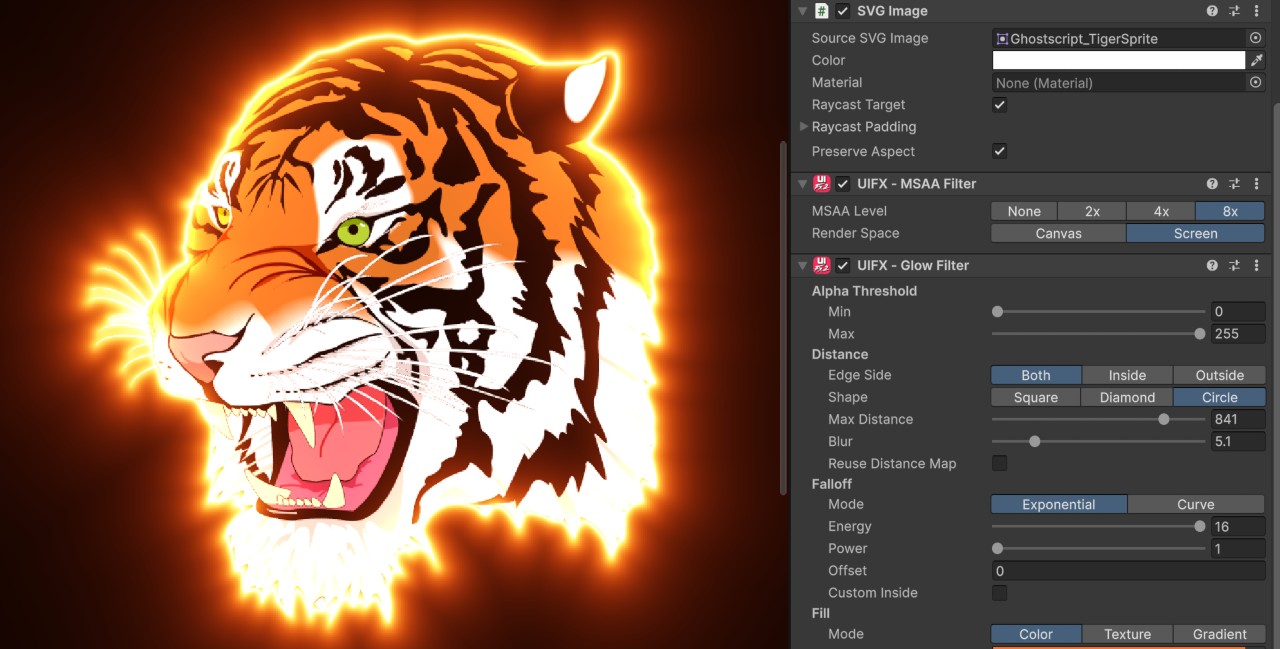
Added support for applying UIFX filters to the SVGImage component (part of the com.unity.vectorgraphics package) which allows SVG vector images to be rendered in UGUI.
Added new MSAA Filter which enabled UGUI components to render with MSAA (multisample anti-aliasing) - especially useful for theSVGImage component.
Changed
Composite Layer now renders in Canvas space rather than Screen space. This fixes a number of issues, especially in world-space (VR) rendering.
Fixed TextMeshPro not updating rendering in Composite Layer when a layout element changed (eg Horizontal Layout) when using Canvas space rendering mode.
Fixed some errors thrown when deleting children of a Composite Layer.
Composite Layer now better handles dynamic changes of children and nesting, and now supports classes derived from TextureMeshProUGUI.
Filters using AnimationCurve optimised to only update their textures when the curve changes.
General code refactoring.
Fixed
Fixed bug where nested Canvas could break support for RectMask2D.
Fixed Glow FilterInside mode not creating glow when object has no zero alpha.
5 August 2026 - Version 2.1.0
Added
Added new Inner Glow Filter beta component, which is very similar to the Photoshop filter of the same name.
Added new Shader Filter beta component, which allows single custom shaders to be applied in the UIFX stack.
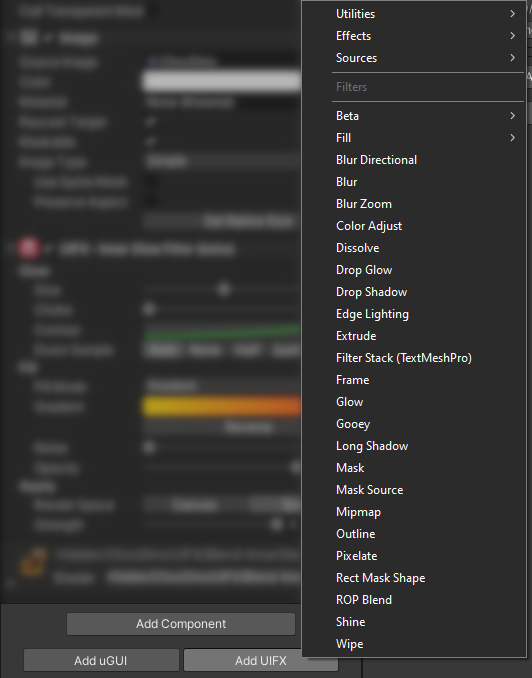
Improved workflow with new Preferences option to show UIFX shortcuts below the [Add Component] button in the Inspector.
Changed
Gooey Filter property Size has been renamed to Grow.
Improved
Outline Filter can now output HDR color and has had shader optimisations. It was also optimised so changing properties that don't affect rendering no longer cause rerendering (eg changing Gradient settings when not in gradient mode).
Shine Filter has new FillSpace property which allows the shine effect to operate in screen-space, meaning you can easily apply a shine to multiple components. It also now has scripting properties exposed.
Added a new powerful component: Composite Layer. This allows UI elements to be combined together and UIFX filters to be applied to all of those UI elements. This opens up so many new options for UI design, as well as performance and workflow improvements!
Added Wipe Filter which includes a ton of transitions.
Added UI Toolkit Filters - currently just our Long Shadow filter has been ported.
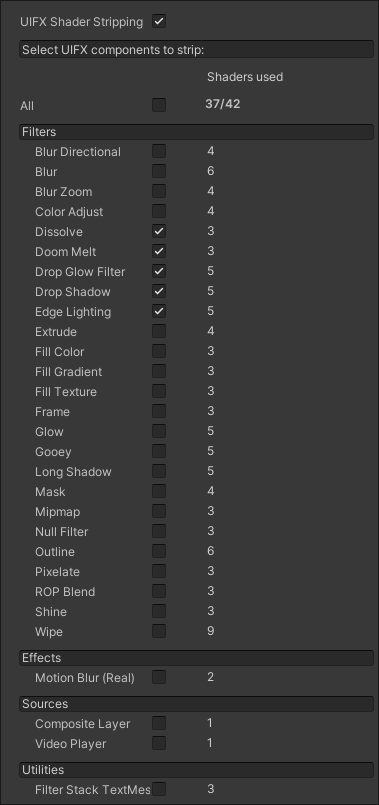
Added Shader Stripping feature, which can reduce build time and build size. Select which filters/effects you aren't using and their shaders will automatically be excluded from builds. Find the new option in Project Settings.
Improved
Glow Filter now better supports transparent graphics.
Changed
The asset has been renamed from UIFX Bundle to UIFX - Pro Bundle. This is because we have released additional UIFX asset bundle types.
Enum type has been FillGradientBlendMode renamed to FillBlendMode.
HoverFilterStrength has been renamed to HoverStrength and now supports non-filter effects (eg Trail, Motion Blur, Vertex Skew).