Motion Blur (Simple) Component
Overview
This component adds an approximate motion blur effect to UI objects that are in motion.
WebGL Demo
Properties
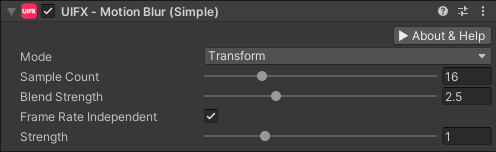
| Property | Type | Details |
|---|---|---|
| Update Mode | Enum | Which vertex modifiers are used to calculate the motion blur. Which vertex modifiers are used to calculate the motion blur. Options are: • Transforms - Only use transform modifications (translation, rotation, scale), this is the simplest. (DEFAULT)• Vertices - Only use vertex modifications.• TransformsAndVertices - Use both of the above, this is the most expensive. |
| Sample Count | Int | The number of motion blur steps to calculate. The higher the number the more expensive the effect. Default is 16. |
| Blend Strength | Float | Controls how transparent the motion blur is. Default is 2.5. |
| Lerp UV | Bool | Allows interpolation of UV texture coordinates. This is usually disabled for text that has animating characters. |
| Frame Rate Independent | Bool | Allows frame-rate independent blur length. This is unrealistic but may be more artistically pleasing as the visual appearance of the motion blur remains consistent across frame rates. Default is enabled. |
| Target Mesh | Enum | Controls which mesh is updated. Options are: • TextMeshPro - Updates the mesh owned by TextMeshPro. This will generate more garbage but may be more compatible with other TMP effects. (DEFAULT)• Internal - Updates the mesh on the CanvasRenderer directly. This is the best performance but may not work well with other TMP effects. |
| Strength | Float | Controls how visible the motion blur effect is by scaling the motion blur length. Setting to zero disables the effect. Above 1.0 will exaggerate the length. Default is 1.0. |
Usage
Add this component to any GameObject that contains a UI Graphic component (eg Text, Image, RawImage, etc). The object will now render with motion blur when it moves.
Quality Notes
- This component has faster rendering than the
MotionBlurRealhowever it is less accurate. For most cases this approximate is good enough. MotionBlurSimpleis a great approximation for solid objects, but for transparency objects it is less accurate and theMotionBlurRealcomponent should be considered. When using this component with transparent objects, the background color can affect this approximation, and so theBlendStrengthproperty needs to be set based on the brightness of the object being rendered and the color of the background. The more transparent the object is, the lower theBlendStrengthvalue needs to be.
Effects Notes
- When using the built-in
Shadowcomponent, it will cause problems due to dark transparent layer under opaque layer, which causes flickering. Therefore when usingShadowcomponent it's better to put it after this component.
How it Works
Within the MotionBlurSimple component the following takes place each frame:
- Store the mesh and transforms for a UI component for the previous and current frames.
- Generate a new mesh containing multiple copies of the stored meshes interpolated from previous to current mesh.
- Replace the UI component mesh with the new motion blur mesh with a reduced per-vertex alpha (
BlendStrengthproperty). - If no motion is detected then the effect is disabled.
TextMeshPro (TMP)
The component MotionBlurSimpleTMP supports TextMeshPro - Text (UI).
Custom UI Components
Any custom UI component will work with MotionBlurSimple as long as it renders using the standard Graphic mesh.
Scripting
Namespace
The namespace
using ChocDino.UIFX;
Add Component
Add the MotionBlurSimple component to your GameObject
// Add the component to your GameObject and set default properties
var mb = AddComponent<MotionBlurSimple>();
mb.UpdateMode = MotionBlurSimple.Mode.Transform;
mb.SampleCount = 16;
mb.BlendStrength = 2.5f;
mb.FrameRateIndependent = true;
mb.Strength = 1f;
Reset Motion
Resetting Motion
// Call ResetMotion() whenever you want to reset the motion blur - for example after resetting the position/transform of the object.
mb.ResetMotion();
Globals
Globals
// Global static fields useful for debugging purposes:
// (These affect all instances of MotionBlurSimple at once)

// Disable the effect - useful for low-powered systems.
MotionBlurSimple.GlobalDisabled = true;

// Add an obvious color tint to the effects - useful to make sure the effect is running.
MotionBlurSimple.GlobalDebugTint = true;

// Stop updating the motion, just display the same frame as last time. This looks like time has frozen - useful for visualising fast moving motion blur.
MotionBlurSimple.GlobalFreeze = true;
Complete Example
MotionBlurSimpleExample.cs
using UnityEngine;
using ChocDino.UIFX;

/// Demonstrates the scripting API for the MotionBlurSimple component
/// Adds the motion blur component to the GameObject and runs a simple
/// translation and rotation animation on the Transform component.

/// Press keys 1 to 4 to test API functionality.

/// NOTE: The GameObject is required to have a UI component of type Graphic
[RequireComponent(typeof(Graphic))]
public class MotionBlurSimpleExample : MonoBehaviour
{
	[SerializeField] float _speed = 10f;

	private MotionBlurSimple _mb;
	private float _time;
	private float _rotation;

	void Start()
	{
		// Get or create the component
		_mb = GetComponent<MotionBlurSimple>();
		if (_mb == null)
		{
			_mb = AddComponent<MotionBlurSimple>();
		}

		// Set the properties to default values
		_mb.UpdateMode = MotionBlurSimple.Mode.Transform;
		_mb.SampleCount = 16;
		_mb.BlendStrength = 2.5f;
		_mb.Strength = 1f;
	}

	void Update()
	{
		AnimateTransform();

		// Keys 1..4 demonstrate API functionality
		if (Input.GetKeyDown(KeyCode.Alpha1))
		{
			// Toggle disabling
			MotionBlurSimple.GlobalDisabled = !MotionBlurSimple.GlobalDisabled;
		}
		else if (Input.GetKeyDown(KeyCode.Alpha2))
		{
			// Toggle debug color tinting
			MotionBlurSimple.GlobalDebugTint = !MotionBlurSimple.GlobalDebugTint;
		}
		else if (Input.GetKeyDown(KeyCode.Alpha3))
		{
			// Toggle time freezing
			MotionBlurSimple.GlobalFreeze = !MotionBlurSimple.GlobalFreeze;
		}
		else if (Input.GetKeyDown(KeyCode.Alpha4))
		{
			// Restart
			_time = 0f;
			_rotation= 0f;
			_mb.ResetMotion();
		}
	}

	void AnimateTransform()
	{
		_time += Time.deltaTime * _speed;

		// Animate position
		float x = Mathf.Sin(_time) * Screen.width;
		this.transform.localPosition = new Vector3(x, 0f, 0f);

		// Animate rotation
		float maxSpinSpeed = 5f;
		float spinSpeed = Mathf.Sin(_time) * maxSpinSpeed;
		_rotation += spinSpeed;
		this.transform.localRotation = Quaternion.Euler(0f, 0f, _rotation);
	}
}